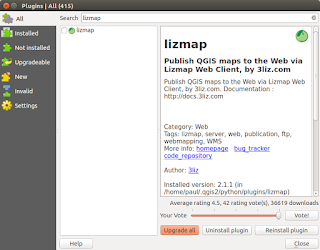
This post follows on from my previous three (most recent first in list) linked below. There is no doubt that in just a short time from now we will probably see a 'one-click' installer to by-pass the next steps but a least this method allows you to change 'in/out' the individual libraries if there is are updates using the usual ' sudo apt update && sudo apt upgrade '. http://www.paulshapley.com/2016/08/qgis-server-bringing-map-into-browser.html http://www.paulshapley.com/2016/07/how-to-install-qgis-server-on-ubuntu.html http://www.paulshapley.com/2016/04/how-to-install-postgresql-95-and.html 1. Firstly...Create a new QGIS project, add your layers from PostGIS, Shapefiles or raster (geotiff), style and symbolise those layers, set the projection and ensure you've set up your 'OWS Server' in 'Project Properties'. 2. Let's install the 'Lizmap' Plugin first by going into the 'Plugins' menu then 'Manage...
I always get frustrated when I update my version of Ubuntu to the next LTS and want to do some development work with the latest stable releases of PostgreSQL and PostGIS. I usually trawl a few web sites to find out what has changed but each time there are slightly different ways of doing the upgrade depending on where you land and who it is doing it. So...to (hopefully) help other people out wasting half a day or so here is my solution. Hope this works for you too... To completely remove all previous installed versions of Postgresql/PostGIS libraries and docs if there is a previous version:- :$ sudo apt --purge remove postgresql postgresql-* :$ sudo apt autoremove Remove old folders:- :$ sudo rm -rf /var/lib/postgresql/ :$ sudo rm -rf /var/log/postgresql/ :$ sudo rm -rf /etc/postgresql/ Remove the old 'postgres' user:- :$ sudo deluser postgres Restart System:- :$ sudo shutdown -r now then:- Update Syste...
It's quite easy to find installation instructions for most Ubuntu versions but it's nice to check they still apply to the most recent release (15.04 at the time writing). I tested this yesterday and it still works for me. My thanks to Hongru Hou (link at the end of the article for full details). Install Apache2 (if not installed):- sudo apt-get install apache2 sudo apt-get update Test Apache2 web server is working:- sudo /etc/init.d/apache2 start sudo /etc/init.d/apache2 stop sudo /etc/init.d/apache2 restart Install Java 7 using the 'Webupd8team' repository:- sudo add-apt-repository ppa:webupd8team/java then:- sudo apt-get install oracle-java7-installer (takes about 10 minutes to download) Install Tomcat7 (because it is GeoServer Web archive this replaces the missing Java Servlet of this edition) sudo apt-get install tomcat7 then in order for tomcat7 to find JDK we need to open and amend one line:- sudo vi /etc/default/tomcat7...
Comments
Post a Comment