Qgis-server...Installing the QGIS Lizmap Plugin & Lizmap Web Client
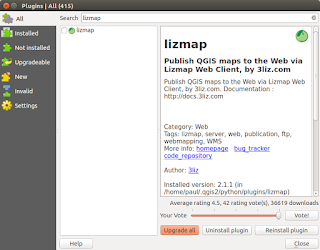
This post follows on from my previous three (most recent first in list) linked below. There is no doubt that in just a short time from now we will probably see a 'one-click' installer to by-pass the next steps but a least this method allows you to change 'in/out' the individual libraries if there is are updates using the usual ' sudo apt update && sudo apt upgrade '. http://www.paulshapley.com/2016/08/qgis-server-bringing-map-into-browser.html http://www.paulshapley.com/2016/07/how-to-install-qgis-server-on-ubuntu.html http://www.paulshapley.com/2016/04/how-to-install-postgresql-95-and.html 1. Firstly...Create a new QGIS project, add your layers from PostGIS, Shapefiles or raster (geotiff), style and symbolise those layers, set the projection and ensure you've set up your 'OWS Server' in 'Project Properties'. 2. Let's install the 'Lizmap' Plugin first by going into the 'Plugins' menu then 'Manage...
Nice post!
ReplyDeleteDette innlegget gir et interessant innblikk i hvordan Kue-pluginen fungerer som en AI-assistent direkte i QGIS og kan automatisere oppgaver som symbologi og geoprocessing. Slike verktøy viser tydelig hvordan AI kan gjøre komplekse GIS-arbeidsflyter mer effektive og tilgjengelige for brukere . For bedrifter som ønsker lignende løsninger, kan man utforske https://www.cleveroad.com/no/ai-chatbot-utviklingstjenester/ for å utvikle skreddersydde AI-chatboter.
ReplyDelete