Qgis-server...Installing the QGIS Lizmap Plugin & Lizmap Web Client
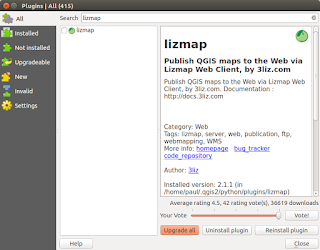
This post follows on from my previous three (most recent first in list) linked below. There is no doubt that in just a short time from now we will probably see a 'one-click' installer to by-pass the next steps but a least this method allows you to change 'in/out' the individual libraries if there is are updates using the usual ' sudo apt update && sudo apt upgrade '. http://www.paulshapley.com/2016/08/qgis-server-bringing-map-into-browser.html http://www.paulshapley.com/2016/07/how-to-install-qgis-server-on-ubuntu.html http://www.paulshapley.com/2016/04/how-to-install-postgresql-95-and.html 1. Firstly...Create a new QGIS project, add your layers from PostGIS, Shapefiles or raster (geotiff), style and symbolise those layers, set the projection and ensure you've set up your 'OWS Server' in 'Project Properties'. 2. Let's install the 'Lizmap' Plugin first by going into the 'Plugins' menu then 'Manage...
Thanks for sharing the QGIS Quick Tips: Working With DB Manager video! This is incredibly helpful for anyone looking to streamline their GIS data management. ecommerce image editing service
ReplyDeleteThis was a useful QGIS tip, especially for users who regularly work with large spatial datasets. DB Manager is a powerful feature that helps organize, query, and manage data directly within QGIS, making geospatial workflows much more efficient. Understanding these tools can be valuable for professionals and students working with mapping, visualization, and spatial analysis. Those interested in similar applications can also explore Image Processing Projects For Final Year to learn how image-based data is processed and analyzed in real-world systems.
DeleteThis post is not just content—it’s an experience. Your ability to guide the reader through a journey of understanding while keeping them hooked is incredible. Thank you for sharing your talent!
ReplyDeleteVisit Here: Amazon photo editing service