Qgis-server...Installing the QGIS Lizmap Plugin & Lizmap Web Client
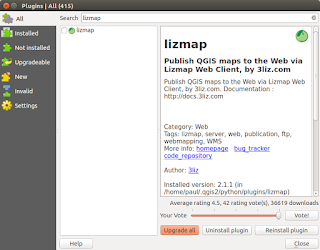
This post follows on from my previous three (most recent first in list) linked below. There is no doubt that in just a short time from now we will probably see a 'one-click' installer to by-pass the next steps but a least this method allows you to change 'in/out' the individual libraries if there is are updates using the usual ' sudo apt update && sudo apt upgrade '. http://www.paulshapley.com/2016/08/qgis-server-bringing-map-into-browser.html http://www.paulshapley.com/2016/07/how-to-install-qgis-server-on-ubuntu.html http://www.paulshapley.com/2016/04/how-to-install-postgresql-95-and.html 1. Firstly...Create a new QGIS project, add your layers from PostGIS, Shapefiles or raster (geotiff), style and symbolise those layers, set the projection and ensure you've set up your 'OWS Server' in 'Project Properties'. 2. Let's install the 'Lizmap' Plugin first by going into the 'Plugins' menu then 'Manage...
App is presented in a very clear and useful way in this article. I really enjoyed reading the explanation because it focuses on the actual user experience instead of simply listing information. The details about Freecine APK helped me understand the application better, especially the discussion about its interface and different ways to explore content. I also liked how the article explains the features in a simple manner that is easy for new users to follow. Overall, this was a helpful guide and gave me a better impression of what to expect from Freecine. I will definitely keep these details in mind when exploring the app https://freecine.com.br/.
ReplyDelete